


Updated November 13, 2026
OpenAI opened Businesses in ChatGPT in beta on November 10, 2026, and every dealership should check this week whether it can claim its profile in Business Hub. A claimed profile puts your store in charge of the details ChatGPT shows shoppers and gives you the first data OpenAI has shared about how often ChatGPT mentions your business.
OpenAI says ChatGPT reaches 1.2 billion people each week. Car shoppers already ask it which stores carry a model, which dealers are worth the drive and what a trade might bring. Until November 10, a dealership had no direct way to correct what ChatGPT showed about it.
We claimed the C-4 Analytics profile on launch day and completed verification on November 13. The screen said claim approval could take up to five minutes, and ours came through in seconds. The details below come from OpenAI's documentation and our own claim and verification. Business Hub is in beta, so we're updating this page as OpenAI changes it.
What Is ChatGPT Business Hub?
Business Hub is OpenAI's dashboard for managing how a business appears in ChatGPT. A business that claims its profile and passes verification can update its details, see insights on how people find it in ChatGPT and, in eligible categories, build a Business Agent that answers customer questions.
Dealers who manage a Google Business Profile will recognize the setup: prove you represent the business, then manage what shoppers see. The ChatGPT profile appears when a shopper clicks on a business named in a ChatGPT answer. Business Hub opens from the ChatGPT sidebar or at chatgpt.com/business-hub.
Business Hub is separate from ChatGPT Business, OpenAI's paid workspace product for employees. The names overlap, and the products are unrelated.
Can Every Dealership Claim Its ChatGPT Profile Today?
Not every dealership can. OpenAI's help center says local stores and restaurants can currently claim only an existing U.S. listing. Online businesses may see an option to add a listing that's missing, but a dealership with no listing in ChatGPT has nothing to claim yet.
Search for your store in Business Hub using the exact name on your website and signage, and try your legal entity name if that doesn't work. Our own listing appears as C-4 Analytics, LLC, the legal name, not the name on our website. If your store appears, you can start a claim. If it doesn't, check back, since OpenAI plans to expand Businesses in ChatGPT to more markets and business categories. One early tester reported landing on a waitlist after choosing a physical location on launch day, so some local businesses may be queued even when a listing exists.
Dealerships that already advertise in ChatGPT have a second route. OpenAI says existing advertisers and Enterprise customers can work with their OpenAI representative to claim their business.
How Do Dealers Claim and Verify a ChatGPT Business Profile?
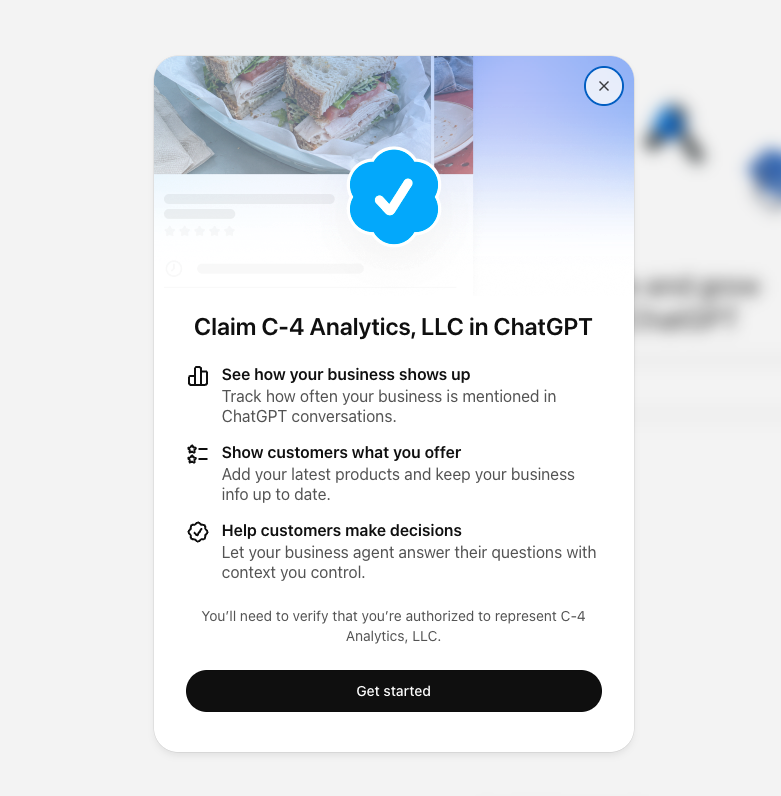
Submitting a claim takes a few minutes, and approval comes after OpenAI reviews it. The process has two checks: one confirms your connection to the business, and a second confirms the identity of the person managing the profile.
- Sign in to ChatGPT with the account the dealership will keep long term, then open Business Hub from the sidebar.
- Search for your store by name and select the listing that matches. If the store name doesn't come up, search the legal entity name.
- Verify your connection to the business with one of the methods OpenAI offers, such as your business phone or a DNS TXT record on your website domain.
- Wait for OpenAI to review the claim. Ours was approved in seconds, but OpenAI says it may email a decision later or ask for more information, and you can cancel a pending claim.
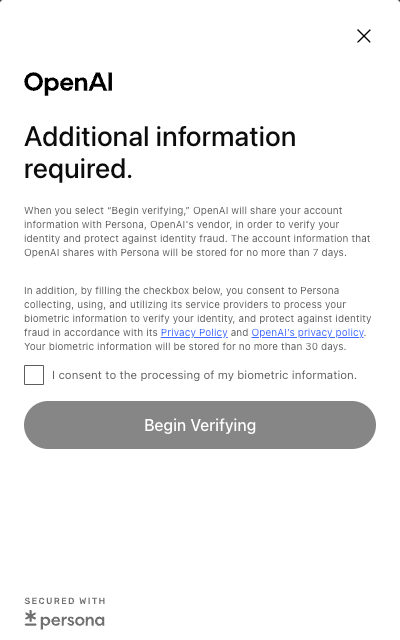
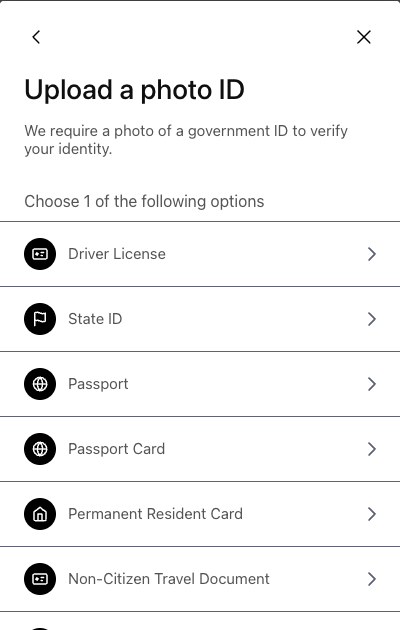
- Complete identity verification with Persona, OpenAI's verification partner. Persona asks for a government photo ID, such as a driver's license, state ID or passport. When we verified our profile, it had us switch to a phone to photograph the front and back of a driver's license, complete a biometric face scan and then enter the company's EIN. The consent screen also asks you to agree to the processing of your biometric information. OpenAI says the account information it shares with Persona is stored for no more than 7 days, and biometric information for no more than 30 days.
You can't edit profile details, see insights or create a Business Agent until the Persona check is approved. The blue verified check on your profile appears only after that second approval, so a claim by itself doesn't verify a store.
If someone else has already claimed your store, Business Hub has a Dispute Ownership option that runs through the same Persona check.
Who at the Dealership Should Own the Profile?
The person who claims the profile should be someone the dealership expects to keep, signed in with an account the store controls. Once a profile is claimed, the admin can add teammates, and each person signs in with their own ChatGPT account. A profile claimed on a departing employee's personal login turns into a support ticket the next time the store changes its hours.
Persona's requirements point the same way. The person verifying photographs their own government ID, completes a face scan and enters the dealership's EIN, and a dealer principal, GM or controller is more likely to have that number on hand than an internet manager. Settle who holds the admin account before anyone starts the claim.
Before you start, confirm:
- Who controls your website domain, main business phone line and business email, since verification runs through one of them
- That your store name, address and phone number match your website and Google Business Profile exactly
- The dealership's EIN and a phone with a camera for the identity check
- Which ChatGPT account will own the profile, and who will check it each month
What Do Business Hub Insights Show Dealers?
Business Hub shows mentions, profile views, website clicks and discovery topics, aggregated over the past 28 days. OpenAI counts mentions differently by business type, and for a local business, a mention means ChatGPT showed a result for that location.
Discovery topics are the recurring themes in conversations where ChatGPT cited your website. They're the most useful number on the screen for a marketing team, because they show which subjects send ChatGPT to your site and which ones never do. If service, financing or a specific model line never shows up, the website content behind it is the first place to look.
The data has limits. OpenAI doesn't share individual conversations or the prompts shoppers typed, and insights appear only after a business clears a minimum number of conversations, so smaller rooftops may see thin numbers at first. Business Hub also covers ChatGPT alone. It shows nothing about Google AI Overviews, Gemini or Perplexity, and it doesn't compare your store with the competitor down the road.
Does Claiming a Profile Help a Dealership Show Up More in ChatGPT?
No. OpenAI states that claiming a profile doesn't change its visibility in ChatGPT, and ChatGPT keeps making its own recommendations. Claiming controls what shoppers see when they open your profile and gives you the data.
How often ChatGPT names your store still depends on what it finds about you across the web, starting with your website. Clear, current pages on inventory, service, financing and location give ChatGPT accurate material to cite.
How Should Dealers Handle Compliance on a ChatGPT Profile?
Hold your ChatGPT profile to the same compliance standard as your website, because OpenAI puts the responsibility on the business. Its Businesses in ChatGPT policy says profiles may include information from other sources, OpenAI doesn't verify every detail a business submits, and businesses are responsible for what they provide.
Mistakes are also hard to undo. OpenAI's help center says only unpublished draft profiles can be deleted, and OpenAI Support can't delete, unpublish or hide a published profile. Before anything goes live, check that hours, descriptions and any offer language match your website and fit your OEM program and state advertising rules.
What Should Dealers Wait On?
Business Agents and vehicle inventory feeds aren't open to dealerships yet.
Business Agents let a business answer customer questions in a labeled conversation inside ChatGPT, kept separate from ChatGPT's own answers. At launch, OpenAI opened them only to eligible ecommerce and online service businesses in the U.S. with a website. Dealerships aren't in that group, and our own verified account doesn't have access either. Any offer to build your dealership a ChatGPT agent today is ahead of the platform.
Product feeds let verified businesses submit products with pricing and availability, and Shopify merchants can connect a store directly. OpenAI hasn't said how vehicle inventory will work. If automotive feeds open up, they could change how ChatGPT answers model and availability questions, and we'll update this page when OpenAI publishes details.
How Does Business Hub Connect to ChatGPT Ads?
Eligible businesses can sponsor their Business Agent and use it as the destination for ChatGPT Ads. OpenAI labels sponsored placements and keeps them separate from ChatGPT's answers, so an ad buys a labeled placement and has no effect on what ChatGPT recommends.
For dealers, that shows where the platform is heading: a claimed profile, an agent and paid placement working together. We already run ChatGPT Ads campaigns for dealers, and an accurate, verified profile is the base that paid strategy builds on as agent sponsorship opens to more categories.
Frequently Asked Questions
Is It Free to Claim a ChatGPT Business Profile?
Yes, for now. Claiming a profile and using Business Hub are free at launch, and you don't need an ads account or an Enterprise agreement. OpenAI hasn't ruled out charging for these tools later. Sponsoring a Business Agent through ChatGPT Ads is paid.
Can a Dealership Add Its Listing if ChatGPT Doesn't Have One?
Not yet. OpenAI currently lets local stores and restaurants claim only an existing U.S. listing. Online businesses may see an option to add a missing listing.
How Does Verification Work?
You verify your connection to the business by phone, business email or website domain, and OpenAI reviews the claim. After approval, the person managing the profile completes a separate Persona identity check before they can edit details or see insights. In our case, that meant photos of a driver's license, a face scan and the company's EIN.
Does Claiming a Profile Improve How Often ChatGPT Mentions a Dealership?
No. OpenAI says claiming a profile doesn't change its visibility in ChatGPT. Claiming gives you control over your profile details and access to mention, click and discovery topic data.
Can More Than One Person Manage a Dealership's ChatGPT Profile?
Yes. After a profile is claimed, the admin can add teammates, and each person signs in with their own ChatGPT account. The dealership should keep the admin account itself.
Can Dealers Build a ChatGPT Business Agent Today?
Not yet. At launch, Business Agents are available only to eligible ecommerce and online service businesses in the U.S. OpenAI plans to expand to more business categories over time.
Can Dealers Add Vehicle Inventory to ChatGPT Through Business Hub?
OpenAI hasn't said how vehicle inventory will work. Product feeds support pricing and availability, and the first direct integration runs through Shopify. Automotive support hasn't been announced.
About C-4 Analytics
C-4 Analytics is an automotive digital marketing solution that has helped dealers grow sales and market share since 2009 and works with hundreds of dealerships today. Our Organic Media team helps dealers get found and accurately represented across Google, AI Overviews and AI assistants like ChatGPT, and we claimed and verified our own ChatGPT profile the week Business Hub launched.
Check Your Dealership's AI Search Readiness
Find out your dealership's AI search readiness today with a Free Comprehensive Market and Digital Presence Analysis.